Building Custom Composables with Custom Themes in Jetpack Compose
A practical guide to theming beyond Material 3 defaults
· 4 min read
Jetpack Compose ships with MaterialTheme out of the box, and for a lot of apps that's enough. But once a design system diverges from Material — different color roles, custom typography scales, spacing tokens, elevation rules — reaching for MaterialTheme.colorScheme everywhere starts to feel like fighting the framework instead of using it. The good news is that Compose's theming model isn't actually tied to Material at all. It's built on CompositionLocal, and you can build your own theme system on the exact same primitive.
This post walks through defining a custom theme from scratch and building composables that consume it, the same way Material's building blocks consume MaterialTheme.
Why build a custom theme?
A few situations where it's worth going beyond MaterialTheme:
• Your design system has its own color roles that don't map cleanly onto Material's (primary/secondary/tertiary, surface variants, etc.)
• You need typography or spacing tokens that aren't part of Material's type scale
• You're theming a component library meant to be reused across multiple apps with different brands
• You want compile-time safety instead of stringly-typed or resource-based theming
You don't have to abandon Material entirely — a custom theme can wrap or sit alongside it. But understanding how to build one from scratch makes it much easier to reason about what MaterialTheme is actually doing under the hood.
Defining your theme tokens
Start with plain data classes for whatever your theme needs to express. Here's a minimal example with colors, typography, and spacing:
data class AppColors(
    val background: Color,
    val surface: Color,
    val accent: Color,
    val textPrimary: Color,
    val textSecondary: Color,
)

data class AppTypography(
    val heading: TextStyle,
    val body: TextStyle,
    val caption: TextStyle,
)

data class AppSpacing(
    val small: Dp,
    val medium: Dp,
    val large: Dp,
)
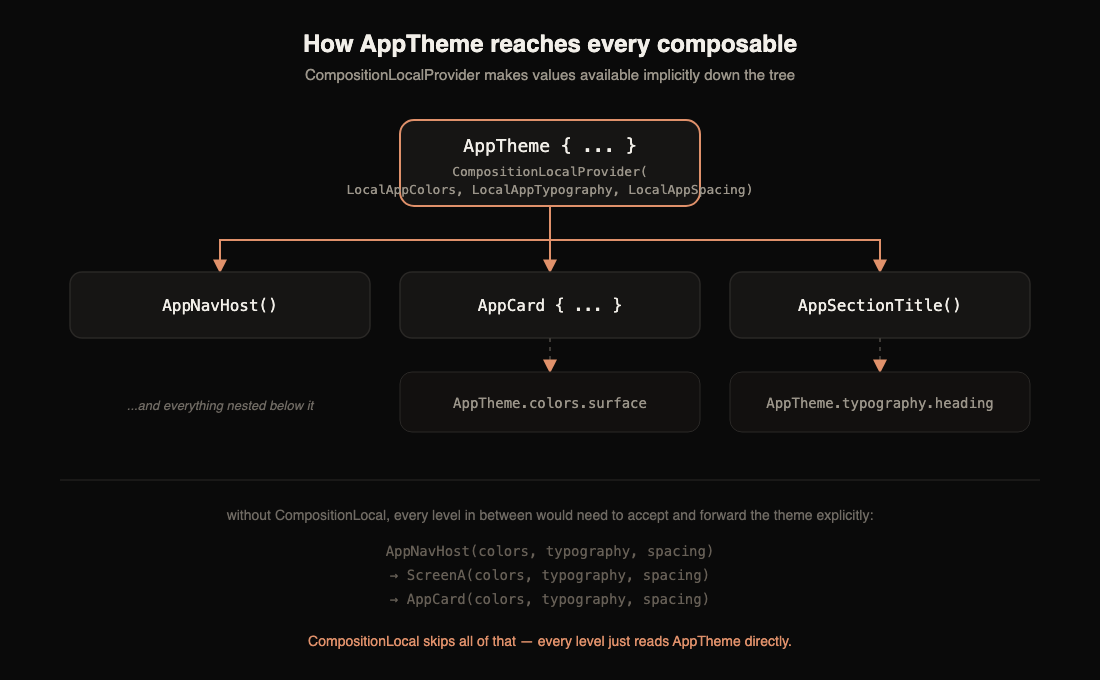
Each of these becomes a CompositionLocal, which is Compose's mechanism for passing data down the tree implicitly, without threading it through every constructor parameter.
val LocalAppColors = staticCompositionLocalOf<AppColors> {
    error("No AppColors provided")
}

val LocalAppTypography = staticCompositionLocalOf<AppTypography> {
    error("No AppTypography provided")
}

val LocalAppSpacing = staticCompositionLocalOf<AppSpacing> {
    error("No AppSpacing provided")
}
staticCompositionLocalOf is the right choice here over compositionLocalOf because theme values rarely change during a composition's lifetime (usually only on a light/dark toggle), so we don't need the finer-grained recomposition tracking the dynamic version provides — it would just add overhead for no benefit. The lambda passed to each one is a fallback that throws if a composable reads the value outside of a provider, which is a deliberate fail-fast: it's a bug to reference the theme without one in scope.
The theme composable
Next, tie the tokens together with a top-level theme composable, the equivalent of MaterialTheme. It provides the CompositionLocals and exposes them through a companion object for ergonomic access.
object AppTheme {
    val colors: AppColors
        @Composable
        get() = LocalAppColors.current

    val typography: AppTypography
        @Composable
        get() = LocalAppTypography.current

    val spacing: AppSpacing
        @Composable
        get() = LocalAppSpacing.current
}

@Composable
fun AppTheme(
    colors: AppColors = if (isSystemInDarkTheme()) DarkAppColors else LightAppColors,
    typography: AppTypography = DefaultAppTypography,
    spacing: AppSpacing = DefaultAppSpacing,
    content: @Composable () -> Unit,
) {
    CompositionLocalProvider(
        LocalAppColors provides colors,
        LocalAppTypography provides typography,
        LocalAppSpacing provides spacing,
        content = content,
    )
}
Wrap your app's root composable in it once, and every descendant can read AppTheme.colors, AppTheme.typography, and AppTheme.spacing without any of them being passed as parameters:
setContent {
    AppTheme {
        AppNavHost()
    }
}
Building theme-aware composables
With the plumbing in place, custom composables read from AppTheme instead of hardcoding values — the same pattern Material's own Button or Card use internally.
@Composable
fun AppCard(
    modifier: Modifier = Modifier,
    content: @Composable ColumnScope.() -> Unit,
) {
    Column(
        modifier = modifier
            .clip(RoundedCornerShape(12.dp))
            .background(AppTheme.colors.surface)
            .padding(AppTheme.spacing.medium),
        content = content,
    )
}

@Composable
fun AppSectionTitle(text: String, modifier: Modifier = Modifier) {
    Text(
        text = text,
        style = AppTheme.typography.heading,
        color = AppTheme.colors.textPrimary,
        modifier = modifier,
    )
}
Because these composables never reference concrete colors or styles directly, they automatically pick up whatever theme is active in composition — light, dark, or a completely different brand palette — with zero changes to their own code.
Supporting light, dark, and beyond
Define concrete instances of your token classes for each variant. This is exactly the pattern used above as the default for colors in AppTheme:
val LightAppColors = AppColors(
    background = Color(0xFFFDFBF7),
    surface = Color(0xFFFFFFFF),
    accent = Color(0xFFB8613F),
    textPrimary = Color(0xFF1A1A1A),
    textSecondary = Color(0xFF6B6B6B),
)

val DarkAppColors = AppColors(
    background = Color(0xFF121212),
    surface = Color(0xFF1E1E1E),
    accent = Color(0xFFD98B6E),
    textPrimary = Color(0xFFF5F5F5),
    textSecondary = Color(0xFFA0A0A0),
)
Because the variant is just a constructor argument to AppTheme, adding a third or fourth palette — a high-contrast mode, or a white-label brand variant — needs no changes anywhere else in the app. Callers who want to force a specific palette (say, in a settings preview) can just pass it explicitly: AppTheme(colors = DarkAppColors) { ... }.
Previewing themed composables
Since custom composables depend on LocalAppColors and friends being provided, previews need to wrap content in AppTheme too, or they'll crash with the "No AppColors provided" error from the fallback lambda:
@Preview(name = "Light", uiMode = Configuration.UI_MODE_NIGHT_NO)
@Preview(name = "Dark", uiMode = Configuration.UI_MODE_NIGHT_YES)
@Composable
private fun AppCardPreview() {
    AppTheme {
        AppCard {
            AppSectionTitle("Preview title")
        }
    }
}
Pairing the two @Preview annotations with uiMode is a cheap way to catch contrast issues before they ship — Android Studio renders both variants side by side in the preview pane.
The core idea is small: a theme is just a set of CompositionLocals plus a composable that provides them. MaterialTheme is a particularly well-designed instance of this pattern, not a special case Compose treats differently. Once that clicks, building a design system that fits your app exactly — rather than bending Material's tokens to mean something else — is mostly a matter of deciding what belongs in your token classes.
Comments
No comments yet.